Automate Your Outreach.Scale Without Limits.

Built for agencies and sales teams scaling outbound without losing the personal touch.

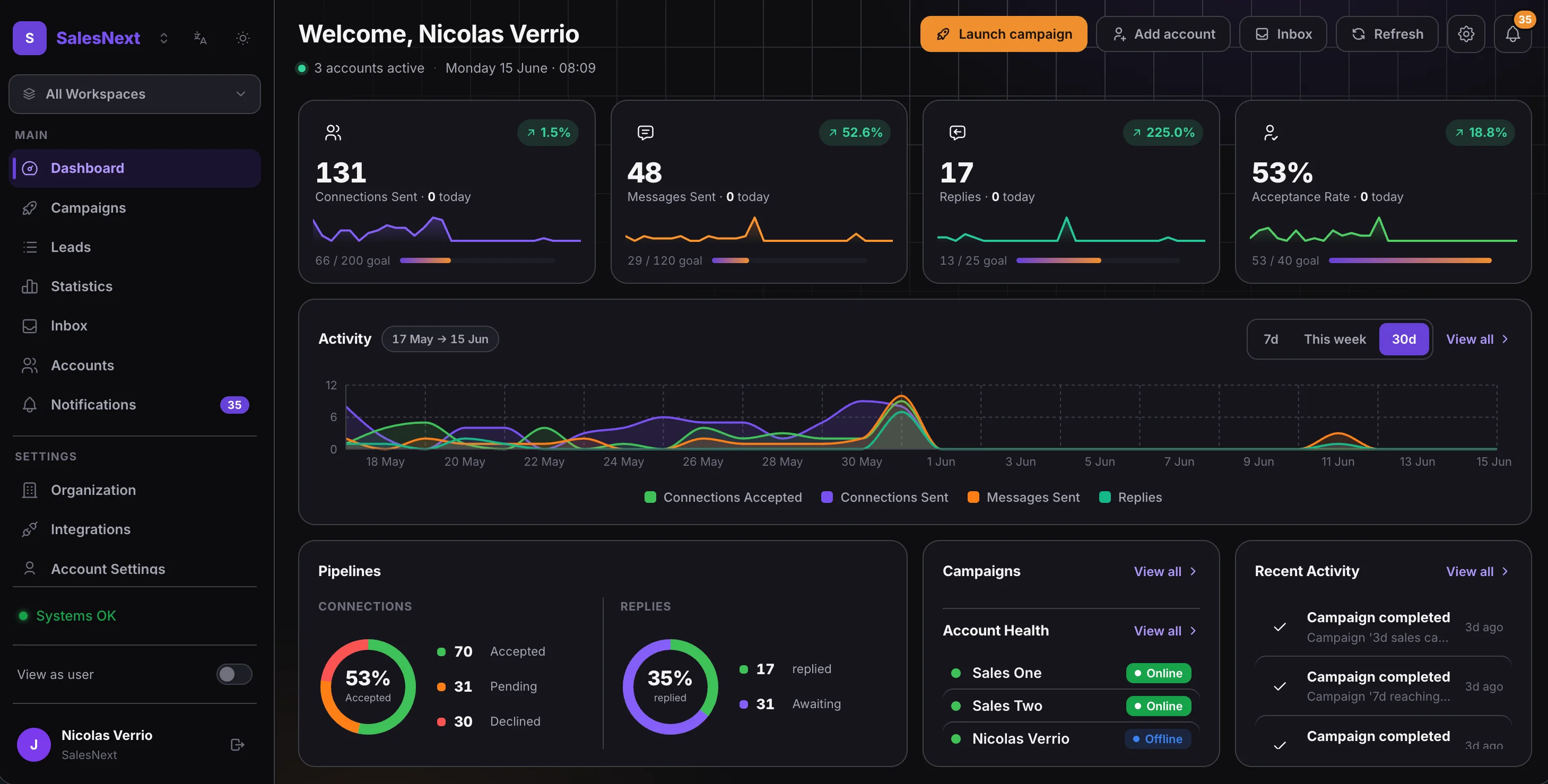
SalesNext dashboard. LinkedIn outreach campaigns, connection stats, and pipeline overview.

Features

Everything you need to automate LinkedIn outreach

One platform for sequencing, account rotation, replies, and analytics. Built for teams sending volume without losing the personal touch.

1
×
2
Visual sequence builder
Drag-and-drop builder for multi-step campaigns with branching logic.
action.connect
action.message
action.follow
Full LinkedIn automation
Connections, messages, InMails, views, and likes.
INTERESTEDSounds great, send me the deck
OBJECTIONPricing's a concern right now
NOT INTERESTEDNot for us right now
Reply sentiment & intent analysis
Auto-classify replies by intent so your team works the interested ones first.
Powerful integrations
HubSpot, Clay, Slack, Zapier, n8n.
Alice BrownNorthwind
Tom BauerContoso
Lena ParkFabrikam
Smart lead import
Sales Navigator, CSV, HubSpot, and Clay. Auto-deduped on import.

Why SalesNext

Objectively better where it actually matters.

Sequences, rotation, and an inbox are the baseline. Here is what we sweat the details on, on top of that. Each one of these is the difference between a campaign that runs and a campaign that stalls.

Sales OnePAUSED
Sales TwoSENDING
Nicolas VSENDING
Account 4SENDING
Zero downtime
One account hits its cap. Every other action keeps running.
Daily limits are tracked per account and per action type. When a sender maxes out connection requests, it keeps sending messages. Every other sender in the campaign keeps working. The campaign never stops just because one counter did.
Most tools
One account hits the daily cap. The whole campaign stalls, or a manager has to swap accounts by hand.
Smart Send
ConnectedDM
ReachableInMail
New contactInvite
One step, three outcomes
Reach out the right way, without three campaigns.
A single Smart Send step checks the lead and picks the right channel automatically. Already connected: it sends a DM. Reachable by InMail on Premium: it sends an InMail. Neither: it sends a connection request. And if an invitation is already pending, it does not spam another one. A/B variants work on each branch.
Most tools
You duplicate the campaign three times (one per channel), or you build a messy branching graph and maintain it forever.
A42% reply
WIN
B24% reply
C18% reply
A/B testing that actually informs
Test message variants at any step, and let the winner win.
Every message step can carry multiple variants with weights. The platform sends them by weighted random and tracks sent count, acceptance rate, and reply rate for each one. Pick a winner when the numbers speak, or leave it running to keep exploring. The rest of the sequence keeps its shape either way.
Most tools
A/B testing is often limited to one step at a time, or means cloning the whole campaign to test another angle.
TitleVP of SalesINCLUDE
Company size201-500INCLUDE
GeographyFranceEXCLUDE
Sales Navigator, without the tab dance
Build the search here. Facets, Include, Exclude, saved lists, notes.
Compose a Sales Navigator search inside SalesNext with the real facets: title, company, headcount, seniority, geography, industry. Include or Exclude on every one, exactly like Sales Nav itself. Import saved searches and prospect lists by URL. Add a note to any Sales Nav lead from the same screen.
Most tools
You build the search in a LinkedIn tab, paste the URL, and hope the tool picks up the same results you saw.

How it works

Up and running in 3 simple steps

No complex setup. Start reaching your ideal customers in minutes.

01

Connect Your Accounts

Link your LinkedIn profiles in seconds. Your team can each connect their own account. SalesNext rotates them safely across campaigns.

02

Import & Target Leads

Import from Sales Navigator, CSV, HubSpot, or Clay. Filter leads so you focus on the highest-value prospects.

03

Launch & Book Meetings

Set up personalised sequences in minutes. SalesNext handles the outreach while you focus on closing deals.

Interactive Demo

See it in action

Take a guided tour of SalesNext and see how easy it is to launch your first campaign.

Pricing

Simple, transparent pricing

Monthly billing. Volume discounts as you grow.

Starter

For solo founders & small teams getting started

$59/month
$59/seat × 1 seat
seat

Unlimited campaigns

Visual sequence builder

Full LinkedIn automation

Smart lead import

A/B testing & templates

Conversation inbox

Real-time analytics

CRM integrations

Agency

For agencies managing multiple client accounts

$1,599/month
Up to 300 seats

Everything in Growth, plus:

Up to 300 seats

Workspaces

Priority support (24h response)

FAQ

Frequently asked questions

SalesNext is built for teams running multi-account outreach. Multiple LinkedIn accounts under one dashboard with automatic rotation, an inbox for replies, and a visual sequence builder with conditions and A/B testing. The Growth and Agency plans give you a fixed price for many accounts, so the cost stops scaling linearly once your team grows.
SalesNext protects accounts with per-account daily limits on connections, messages, profile views, and InMails, plus an optional 14-day warm-up for new or dormant accounts that gradually ramps daily activity from 20% to 100% of your configured caps. The defaults are tuned to keep accounts well inside LinkedIn's rate limits.
One LinkedIn account per user, so each seat gives you one connected account. Starter is per-seat with no cap, Growth covers 50 seats at a fixed monthly price, and Agency scales up to 300. Upgrade when your team outgrows the current tier.
Sales Navigator Premium is required to use Sales Nav features: search imports, saved-search imports, prospect-list imports, and Premium notes. Premium Messages and Smart Send also need a Premium account. Without it, you can still import leads from CSV, HubSpot, Clay, or post reactors, and use the rest of the product as normal.
Pick a plan and pay: your organization is created on the spot. Sign in, connect your LinkedIn account, import some leads, build a sequence, and launch. If you get stuck, email contact@salesnext.io and someone will help.
Yes. SalesNext runs every LinkedIn action inside your own Chrome via the extension, so Chrome must be open and signed in to LinkedIn, with a signed-in SalesNext tab open. If you use Sales Navigator features (searches, imports, or Premium notes), keep a Sales Navigator tab open as well. If the extension goes offline for about 10 minutes, campaigns pause automatically and resume once it comes back online.

Still have questions?

Our team is here to help you get started.

Ready to scale up your LinkedIn outreach?